Addon Guide · Beginner Friendly

Resin2FDM Walkthrough

Resin2FDM Designed by Painted4Combat
Maintained by Clonephaze

A step-by-step guide for the R2FDM workflow, designed for beginners and experienced users alike to follow along. Start with "I just installed the addon" and end with a ready-to-print FDM miniature.

New to Blender? No worries — the next section explains the minimum you need to know.

Clonephaze — R2FDM Dev

Section 1

Before You Start

This addon is designed so that you can follow a fixed set of steps in the same order every time. You do not need to understand all of Blender to be successful with Resin2FDM.

What you need installed

You do not need a special PC or pro tools, but a few basics are required:

  • Blender 4.0 or newer (4.2+ recommended). Earlier versions may not reflect the workflow exactly as in this guide.
  • The Resin2FDM addon installed and enabled in Blender.
    If you are not sure, go to Edit → Preferences → Add-ons and search for Resin2FDM. Make sure the checkbox is ticked.
  • At least one STL file that already has resin supports on it. (This addon expects a pre-supported model.)
Optional but helpful:
keep a test miniature handy that you do not mind experimenting on while you learn the workflow.

A 2-minute Blender crash course

We are only going to touch a tiny, safe slice of Blender. If you know these basics, you are ready:

  1. The 3D Viewport
    This is the big main window where you see your model. When this guide says "in the 3D view" or "in the viewport", it means that area.
  2. Objects vs. the scene
    A scene is just a container that holds objects. Each imported model, support cluster, or helper thing is an object. Resin2FDM will create and rename objects like MINIATURE and SUPPORTS for you.
  3. Selecting things
    By default in Blender 4, you left-click to select. You can hold Shift and left-click to select more than one object. When this guide says "select the miniature", it means click those object(s) in the viewport so they turn highlighted.
    To de-select everything, click on empty space in the 3D Viewport, or press Alt+A. To remove just one object from your selection, hold Shift and left-click it again.
  4. Where to find Resin2FDM
    In the 3D Viewport, press N on your keyboard. A side panel will slide out on the right. Look for a tab called Resin2FDM. All of the buttons and panels in this walkthrough live there.

If anything behaves unexpectedly, remember that Ctrl+Z will undo the last operation. You can press it multiple times to step back through what you just did until the scene looks right again.

Section 2

Core Workflow: One Model, Start to Finish

Follow these steps in order for a typical supported miniature: prepare a clean scene, import, split, assign the miniature, thicken supports, export, then move into Orca for slicing.

Step 1 - Prepare a clean Resin2FDM scene
Resin2FDM Setup panel with the Prepare Scene button
Resin2FDM Setup panel with the Prepare Scene button.

1. In Blender, switch to the Resin2FDM tab in the right-hand N-panel of the 3D Viewport.

2. Click the button labelled Prepare Scene.
- If you have already used the addon in this Blend file, the button may say Reset Scene instead.

3. What this button actually does (in plain language):
- Creates or resets a scene just for this workflow.
- Sets the units so that 1 Blender unit = 1 mm, which keeps scaling sane for printing.
- Optionally shows a "build plate" visualizer (enabled in Edit → Preferences → Add-ons → Resin2FDM) so you have a sense of your printer's size.
Step 2 - Import your supported model

Resin2FDM Setup panel showing the Import STL button
After Import STL, your pre-supported model will appear in the 3D Viewport.

1. In the same Setup section, click Import STL. Blender will open a file browser window.

2. Browse to the folder where you keep your pre-supported resin models. - You can select one STL or several STLs to import at once, useful for models that are split into multiple pieces.

3. Click Import STL in the file browser.
- If you imported one file, you will usually see one object.
- If you imported several, you may see them stacked near each other or overlapping for now.


4. At this point you do not need to fix the position, rotation, or size of the model. Resin2FDM will handle snapping your model to the plate and splitting in the next steps.

Step 3 - Split model by loose parts

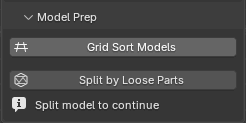
Model Prep panel with Grid Sort Models and Split by Loose Parts buttons
Model Prep with Grid Sort Models and Split by Loose Parts

1. In the Model Prep section, click Grid Sort Models (if you see this button). Resin2FDM will arrange your objects into a grid.

2. Click Split by Loose Parts. This is the first "real work" step:
- During this step, you will see a progress bar in the Resin2FDM header. You can press Esc to cancel if it seems stuck.
- The tool will also move each piece so its bottom sits on Z = 0, which lines up with your printer's build plate.


3. When the split is done, Resin2FDM marks the scene as "split complete", unlocking later parts of the workflow, such as assigning the miniature and optional advanced features like tip detection.

Step 4 - Assign miniature vs supports

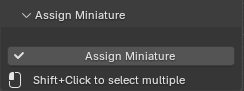
Assign Miniature panel with matching button
Assign Miniature panel with matching button.

1. Before you continue, you need to tell Blender which pieces of geometry are the actual model (the miniature) and which are just supports.

2. In the 3D Viewport, use left-click (and Shift + left-click for multiple objects) to select only the miniature parts.
- Do not select the support columns or tips.
- If you accidentally select something wrong, press Ctrl+Z to undo and try again.


3. Once you are happy with your selection, click Assign Miniature. Resin2FDM will:
- Merge your selected objects into one and rename it to MINIATURE.
- Look at the remaining pieces and automatically separate them into SUPPORTS (thin columns and connection pieces) and, when appropriate, a BASE object.

Step 5 - Thicken supports

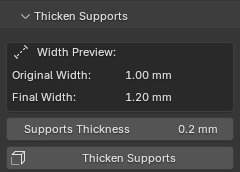
Thicken Supports panel with Supports Thickness slider
Thicken Supports panel with Supports Thickness slider.

1. In the Thicken Supports panel you will see two values, a slider, and a thicken supports button.
- The first value shows the current average diameter of typical support columns in mm.
- The second value shows an estimated new diameter after thickening.


2. Drag the slider to choose how much extra material to add to the support columns.
- You want to shoot for making your supports 1mm to 1.8mm after thickening, depending on your nozzle size and printer capabilities.
- Most find that 1-1.4mm final diameter works well for even 0.4mm nozzles.


3. Once you are happy with the thickness, click Apply Modifier. This "bakes" the thickness into the actual geometry so your slicer sees the stronger columns.
- If you change your mind, you can still undo with Ctrl+Z immediately after applying.

Step 6a - Export STL files

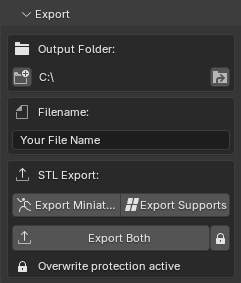
Export panel showing STL export options
Export panel with STL export buttons.

1. You will see a field for the output folder and a base file name.
- By default R2FDM will set the export folder to the same folder where you imported the STL from.
- Click `Set Output Folder` (left) to change it.
- Click `Open Output Folder` (right) to quickly open the folder in your file browser.

2. There is also a field to set the base name of your exported files. By default it uses the name of the imported STL file.

3. Choose one of the three export buttons:
- Export Miniature writes only the MINIATURE object.
- Export Supports writes only the SUPPORTS object.
- Export Both writes two STL files at once using the base file name plus a suffix.
- If the file already exists, the tool will warn you. If you still wish to overwrite it, press the lock icon.

Step 6b - Optional: Export a 3MF scene

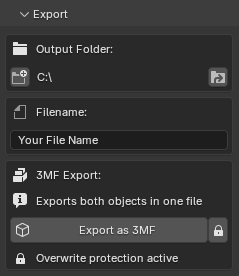
Export panel showing 3MF export option enabled
Export panel with 3MF export enabled (Standard only).

This step is optional and only available in the Advanced version of the addon. If you are using Resin2FDM Lite, or your slicer does not support 3MF, you can skip this and stick to the STL exports.

1. In the Feature Toggles panel, enable 3MF Export. This reveals the Export 3MF button in the Export panel.

2. Back in the Export panel, make sure your output folder and base file name are set the way you like, then click Export 3MF. Resin2FDM writes a single 3MF file that contains both the miniature and supports as separate objects in one scene.

- Users have reported this allows them to use R2FDM exports in PrusaSlicer as well.

Core workflow, complete!

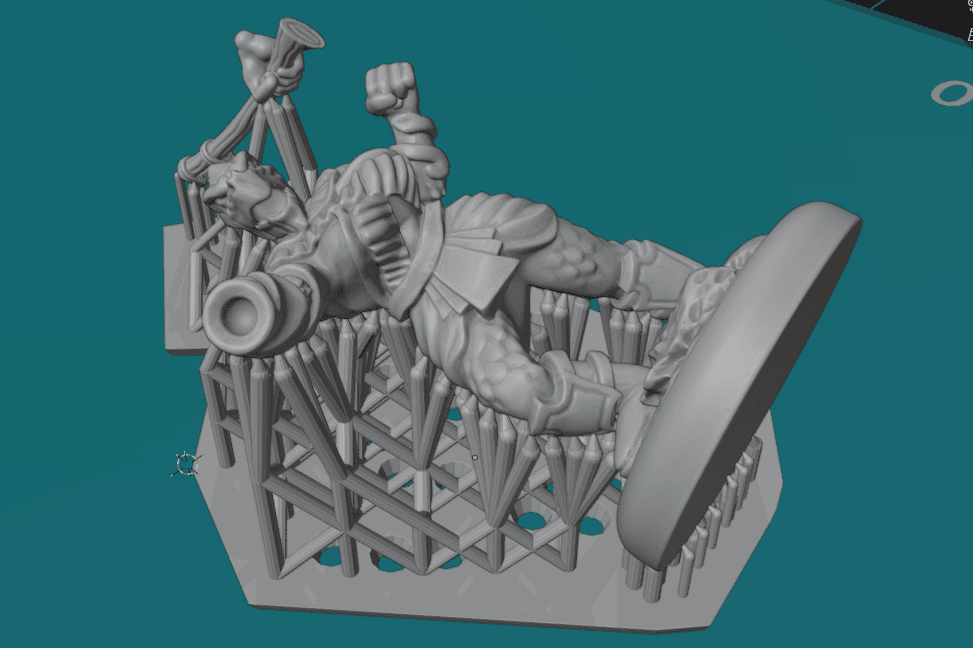
Finished Resin2FDM export ready to be sliced
At this point your Blender-side Resin2FDM workflow is done.

Great job! You now have clean FDM-ready exports of your miniature and supports from Blender. From here you have two paths.

Option A: Go straight to slicing
- Bring your exported STL or 3MF files into your slicer of choice, but this guide will specifically go over using Orca Slicer.
- The next section walks through import, splitting, and recommended processes step-by-step.
- Similar slicers such as Prusa Slicer can be used, but support is only given for Orca.

Option B: Explore advanced Resin2FDM features
- Features like Tip Detection (Easier Support Removal/Cleanup), Auto-Select (Find Miniature Parts), Mesh Repair (Specially designed for Miniature and Supports), and extra export tricks can help with trickier models or speed up your workflow.

Section 3

OrcaSlicer Import & Slicing

How to bring your Resin2FDM exports into OrcaSlicer (and similar slicers) and apply recommended print settings.

Step 1 - Import and split in Orca

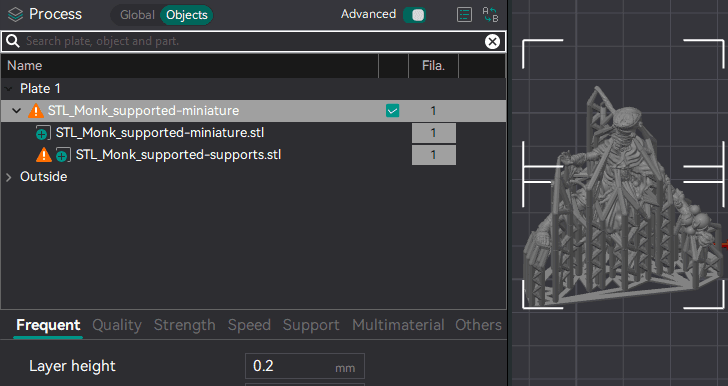
Orca Slicer objects panel showing miniature and supports split into two objects
Import the miniature, supports, and optional tips together, then split them into separate objects.

With Blender done, it is time to move into OrcaSlicer or another slicer based on the Orca framework (such as Bambu Studio or Elegoo Cura/Orca).

1. Open Orca on a blank project.

2. Find the files you exported from Blender: one for the MINIATURE, one for the SUPPORTS, and (optionally) one for SUPPORT_TIPS if you used the tip export features. Select all of them at the same time and drag them into the Orca window.
- If you exported a single 3MF scene instead of STLs, just drag that one file in.

3. When Orca pops up a dialog asking how to import, choose "Import as single object". This keeps everything perfectly aligned in 3D space.

4. In the Objects panel, right-click the combined object and choose Split → to objects. You should now see separate entries, one for each imported object, still sitting exactly where they should around each other.

Step 2 - Recommended Orca processes

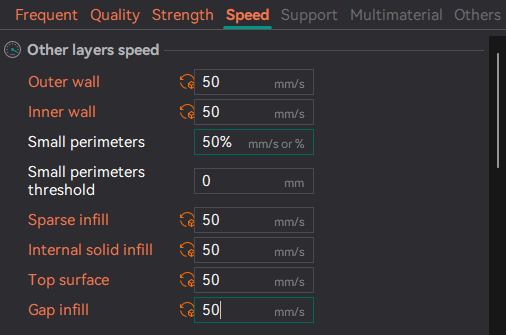
Orca Slicer process settings showing different layer height and speed for supports
Use separate processes for the miniature and supports.

These recommendations are based on Painted4Combat's testing with 0.2 mm and 0.25 mm nozzles on common FDM printers like the Neptune 3 Pro and Bambu A1. Feel free to adjust for your own machine, but this is a solid starting point.

1. Miniature process
- Start from a high-detail profile for your printer with a layer height around 0.08-0.12 mm.
- Keep your usual wall count and infill.


2. Support process
With the supports object selected:
- Set the layer height to roughly double the miniature's layer height (for example, 0.16 mm if the mini is at 0.08 mm). This prints supports only every second layer and saves a lot of time.
- Set wall loops to 2.
- In the Strength tab, set Minimum Sparse Infill Threshold to 0. This stops the support towers from printing solid while still allowing infill if the raft is thick enough to require it.
- In the Speed tab, set most speeds for the support object to around 50 mm/s.
- If you see supports snapping mid-print on your machine, lower the outer wall speed for supports to around 35-40 mm/s as a safety margin.

Step 3 - Slice, preview, and export

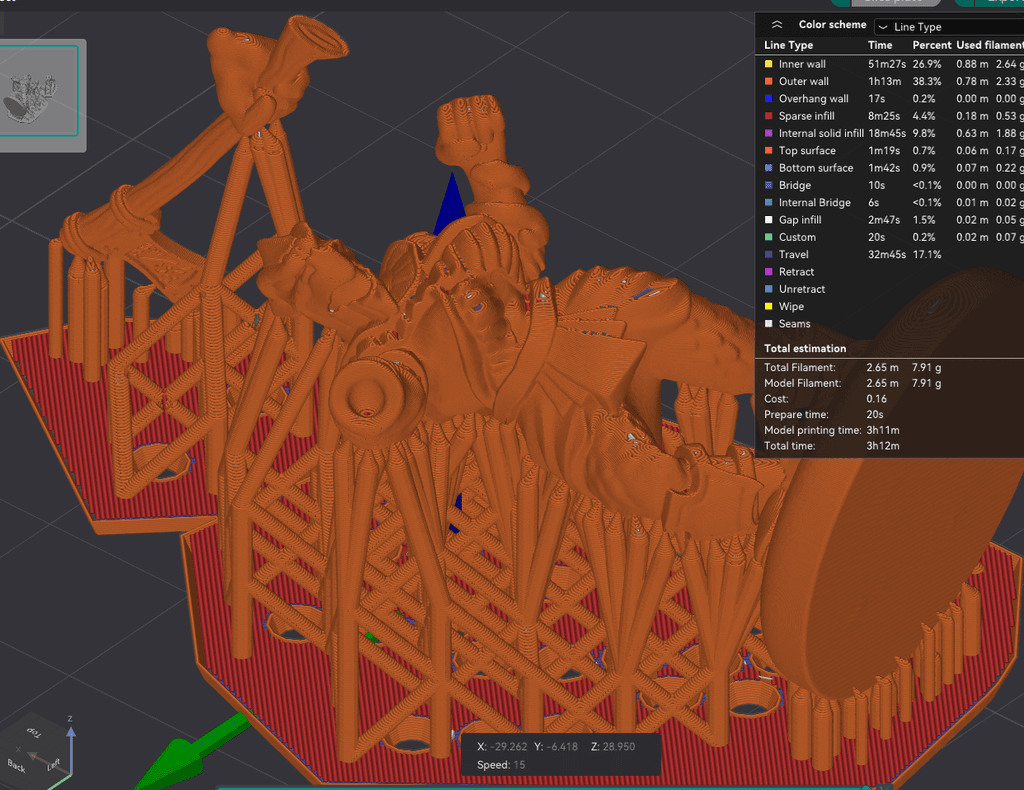
Orca Slicer preview showing miniature and supports
Check the preview before sending the file to your printer.

Once your processes look good, it is time to slice and sanity-check the toolpaths.

1. Slice and preview
- Slice the project and scrub through the layers in the preview. You should see the miniature printing at your fine layer height and the supports printing with thicker, faster layers.
- Make sure supports reach the model cleanly and that no islands are left unsupported.
- On a typical hero-sized character, this change alone can turn a 6+ hour ultra-fine print into something closer to 4 hours, without sacrificing visible detail on the model itself.


2. Export or send to printer
- When you are happy with the preview, export the G-code or send the job to your printer as you normally would.
- After printing, remove supports carefully with flush cutters or a hobby knife, then clean up any remaining marks with a blade or small files.


Hardware and filament tips
- Use a 0.2 mm nozzle for the sharpest miniature details and more reliable tiny supports. A 0.25 mm nozzle can also work well; a 0.4 mm nozzle is possible but much less forgiving.
- Choose a slightly matte or satin PLA if you can. Very glossy or hard filaments tend to cling to supports more and can make cleanup harder.

Section 4

Optional Advanced Features

Once the basic workflow feels comfortable, these tools can speed things up or handle trickier models. They are completely optional for your first successful print.

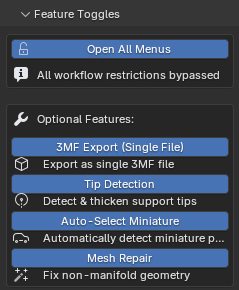
Feature toggles & "Open All Menus"

Feature Toggles panel
Feature Toggles panel.

The Feature Toggles panel controls which parts of the addon are visible and how guided the workflow feels.

If you are just starting out, the core workflow above works fine with all advanced toggles off.

Open All Menus: When it is on, you will see all panels all the time, even if the scene is not ready for them yet. Useful if you already understand the workflow and just want quick access.

The rest of the features in this panel are only available in the Advanced version of the addon (3MF Export, Mesh Repair tuning, Tip Detection, etc.). If you are using Resin2FDM Lite, you will see fewer options here, which is normal.

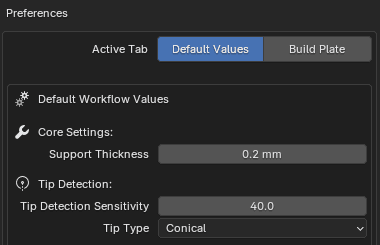
Custom default values

Resin2FDM Preferences panel in Blender
Resin2FDM Preferences in Blender's Add-ons settings.

You can customize how Resin2FDM behaves every time you start a new scene.

1. Go to Edit → Preferences → Add-ons and search for Resin2FDM. Expand the addon entry to reveal its preferences.

2. Here you can set your own default values for things like support thickness, tip size, detection sliders, and which feature toggles are enabled by default.

3. Once you have dialed in settings that work well for your printer and workflow, they will be applied automatically every time you click Prepare Scene. No need to tweak the same sliders over and over.

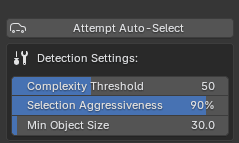
Auto-select miniature parts

Auto-Select panel with Attempt Auto-Select button
Auto-Select panel.

1. Available after you run Split by Loose Parts, and after Support Tip Detection if enabled. Click Attempt Auto-Select and Resin2FDM will look at each loose piece in the scene and guess which ones are likely to be the real model instead of supports.

- Use `Complexity Threshold` to adjust how complicated the piece in question should be. Supports are fairly simple.
- Use `Min Object Size` to ignore tiny pieces that are unlikely to be the miniature.
- Use `Select Aggressiveness` if you have many model pieces close together. Lower values select more.


2. Before you click Assign Miniature, always double-check the selection in the 3D Viewport. If the tool has selected some obvious supports, remove them from the selection with Shift + left-click or undo and try again with slightly different settings.

Think of Auto-Select as a helper that gets you close to the right answer, but you still make the final call.

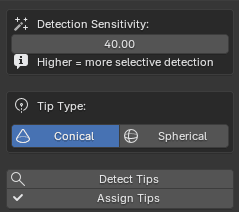
Tip detection & thickening support tips

Tip Detection panel with Detect Tips button
Tip Detection panel.

1. Available just after splitting by loose parts. Choose your support tip shape and size:
- Use the slider to set the expected tip size.
- If your imported model is using cone-shaped tips choose Conical, or Spherical for rounded tips.
2. Click Detect Tips and Resin2FDM will scan the loose objects in the scene for objects that look like tiny support tips.

3. If successful, click Assign Tips, then move on to assigning your miniature.

3. Once regular supports have been thickened, go to the Thicken Tips panel. Just like with Thicken Supports, you can adjust a slider to beef up only the very ends of the supports.
This can help prevent tiny tips from vanishing in the slicer or failing during printing, without over-thickening the whole column, and cleaner support spots on the miniature.

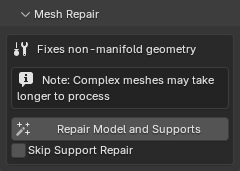
Mesh Repair tuning

Mesh Repair panel
Mesh Repair panel.

This feature is optional and only available in the Advanced version of the addon. If you are using Resin2FDM Lite, or if your slicer loads the model without errors, you can safely skip this.

When you click the repair button, Resin2FDM will scan through each object and attempt to fix common mesh issues.
- On complex models this can take a while, because Blender is inspecting and cleaning every part of the geometry.
- The tool tries to fix problems, not simply delete geometry, but it can still change the mesh in ways you may notice on very delicate details.
- If you dislike the result, use Ctrl+Z to undo and consider skipping mesh repair for that model.


You will likely still see some warnings in Orca or other slicers about the SUPPORTS having manifold issues, but these can usually be ignored for standard FDM printing, as they come from how resin supports are generated and do not normally affect the final print.

3MF export & combined STL tricks

Export panel showing 3MF export option enabled
Export panel with 3MF export enabled (Standard only).

By default, Resin2FDM exports separate files for miniature and supports so you can control them independently in the slicer. There are a couple of extra tricks if you want a more bundled workflow.

1. As described in Step 7b, enabling 3MF Export (Standard/Advanced only) gives you a single 3MF scene with miniature and supports together.

2. If you prefer STLs but want a quick "everything together" export, you can hold Alt while clicking Export Both. This writes an additional combined STL that merges MINIATURE and SUPPORTS into a single mesh.

Separate Support Tips Export (Multi-Material)

Export panel showing export options
Export panel — hold Ctrl to export tips separately.

For multi-material printing workflows, you can export support tips as a separate file or object. This allows you to assign different materials in the slicer — for example, PETG tips with PLA supports for easier removal.

How to use:
- When exporting supports (STL or 3MF), hold Ctrl while clicking the export button to export tips separately.
- STL exports create separate files: {name}-supports.stl and {name}-support_tips.stl, each with their own level cube offset by 0.6mm to prevent collision.
- 3MF exports keep tips as a separate part/body named Support_Tips within the same archive.
- The Export Both button also supports Ctrl+click to generate three separate files: miniature, supports, and tips.


This feature is especially useful if you want to print tips in a material that releases cleanly from your miniature, reducing cleanup time and leaving smaller contact marks.

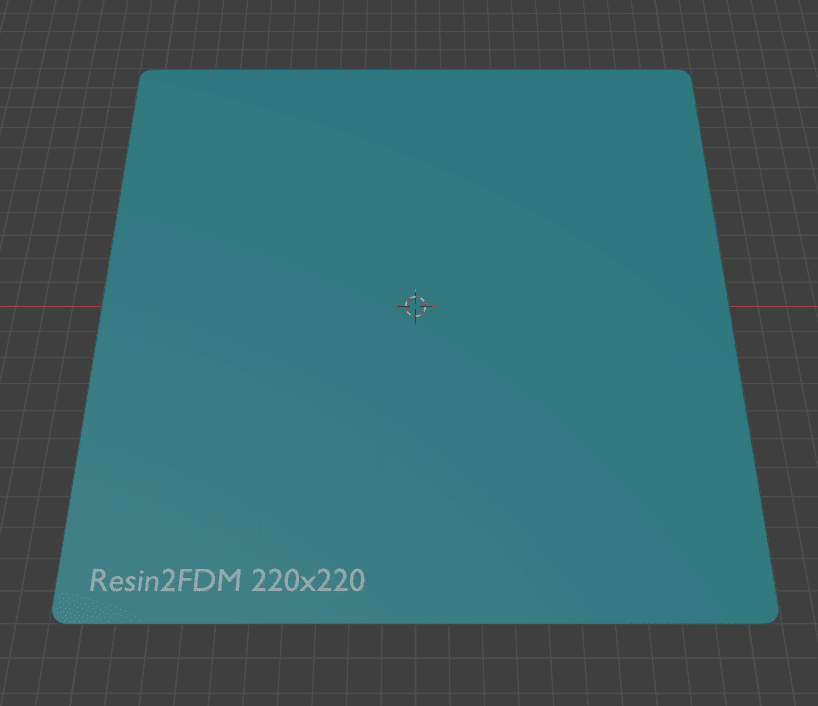
Build Plate Visualizer

Build Plate Visualizer in the 3D Viewport
Build Plate Visualizer.

If you want a visual reference for your printer's bed size while working in Blender, you can enable the Build Plate Visualizer.

1. Open Resin2FDM preferences in the preferences window, then check the Show Build Plate option and enter your printer's X, Y, and Z dimensions in millimetres.

2. The next time you click Prepare Scene, a transparent plate representing your build plate will appear in the 3D Viewport. This helps you see at a glance whether your miniature and supports will fit on your printer before you export.

3. You can also toggle the build volume visualizer, which will give you a box showing the full printable height of your printer.

Section 5

FAQ & Troubleshooting

Real problems you might hit, and the fastest way to recover from them.

Most of the time this means the scene is not yet in the state that panel expects. Resin2FDM hides or disables things on purpose so you do not accidentally skip important steps.

1. If the Model Prep or Assign Miniature panels are missing, make sure you have clicked Prepare Scene and then Import STL in the Setup panel.

2. If later panels are greyed out, check that you have run Split by Loose Parts (Step 3) and successfully assigned a MINIATURE (Step 4). Some tools will only appear once the scene is marked as "split complete" and a miniature exists.

3. If you want to see every panel regardless of state, enable Open All Menus in the Feature Toggles panel. This will not force tools to run out of order, but it will expose everything for inspection.

This usually means there are extra Blender objects in the scene (like cameras or lights) that Resin2FDM did not create. The addon wants a clean, predictable environment so it knows which objects to manage.

1. If you are comfortable in Blender, you can open the Outliner (top-right by default) and delete any Camera or Light objects from the current scene.

2. The simpler option is to go back to the Setup panel and click Reset Scene (or Prepare Scene if you have not run it yet). Then re-import your STL and continue from Step 2.

Once only Resin2FDM objects remain, Assign Miniature should stop complaining.

These tools are helpers, not magic. On some models (especially very simple or very noisy ones) they will not find anything reliable.

1. For Auto-Select, try lowering the Complexity Threshold and slightly reducing Min Object Size, then run Attempt Auto-Select again. This tells the tool to consider more pieces as possible miniature parts.

2. For Tip Detection, double-check that the tip size and shape roughly match what the sculptor used. If your tips are very small, moving the expected size slider down a bit can help.

3. If you have tried small adjustments and still get nothing useful, do not fight the tooling. Fall back to the manual workflow described in Steps 4 and 5: select the miniature yourself, assign it, and thicken supports. The core workflow does not depend on these helpers.

After thickening, you may notice the miniature or supports appear slightly higher off the build plate than before. This is intentional.

By default, Resin2FDM tries hard not to accidentally destroy your previous exports. If a file with the same name already exists in the output folder, the addon will warn you and block the write.

In the Export panel you will see a small lock icon next to the overwrite warning. Click this lock to temporarily allow overwriting existing files. Once it is unlocked, run your export again and the new files will replace the old ones.

If you want to keep both versions, leave the lock engaged and instead change the base file name before exporting.

Section 6

Glossary: Blender Terms in Plain English

Short, practical definitions focused only on what you need for Resin2FDM.

Scene
A container that holds all the objects for a particular setup in Blender. Resin2FDM creates and resets its own scene so it can safely manage your miniature, supports, and helper objects without touching your other work.
Object/Model
Any individual thing in the 3D Viewport: a model, a support cluster, a camera, a light, or a helper like the level cube. When this guide says "select the miniature", it means select the objects that make up the model in the viewport.
Modifier
A non-destructive effect you can apply to an object, such as thickness or smoothing. Resin2FDM uses modifiers to thicken supports and tips before you click Apply Modifier to bake the changes into real geometry that your slicer can see.
MINIATURE
The main model you care about printing. After you run Assign Miniature, Resin2FDM merges your chosen pieces and renames the result to MINIATURE so later tools know which object is the hero.
SUPPORTS
All of the support columns, cross-braces, and similar helper geometry that holds the miniature up during printing. These are separated from the miniature so you can thicken and export them independently.
BASE
A flat or decorative platform the miniature stands on. When Resin2FDM detects a base, it keeps it as a separate object so you can easily see and manage it in the slicer.
SUPPORT_TIPS
A special object that holds only the tiny contact points at the ends of supports (Advanced version only). Created by the Tip Detection tools so you can thicken just the tips without over-thickening the entire support column.
Build plate
The virtual representation of your printer's bed. In Resin2FDM, Z = 0 is treated as the build plate surface. The optional build plate visualizer helps you see roughly how your miniature will sit on your real printer.
Level cube
A tiny helper cube that Resin2FDM adds under the miniature when exporting. It gives slicers a clean reference for the build plate and helps keep the model from floating slightly above or sinking into Z = 0.
Non-manifold
A technical term for geometry that is not perfectly "watertight". Many resin support structures are non-manifold in ways that do not matter for FDM printing, so minor warnings about SUPPORTS can usually be ignored.
Lite vs Advanced (Standard)
Resin2FDM Lite includes the full core workflow: prepare, import, split, assign, thicken supports, and export. Advanced/Standard adds optional tools like Tip Detection, Auto-Select, Mesh Repair, and 3MF export. This guide is written so both versions can follow the same main steps.